Rankevra Blog
SEO Content Audit: The Pre-Scaling Gate Before You Publish
September 3, 2026
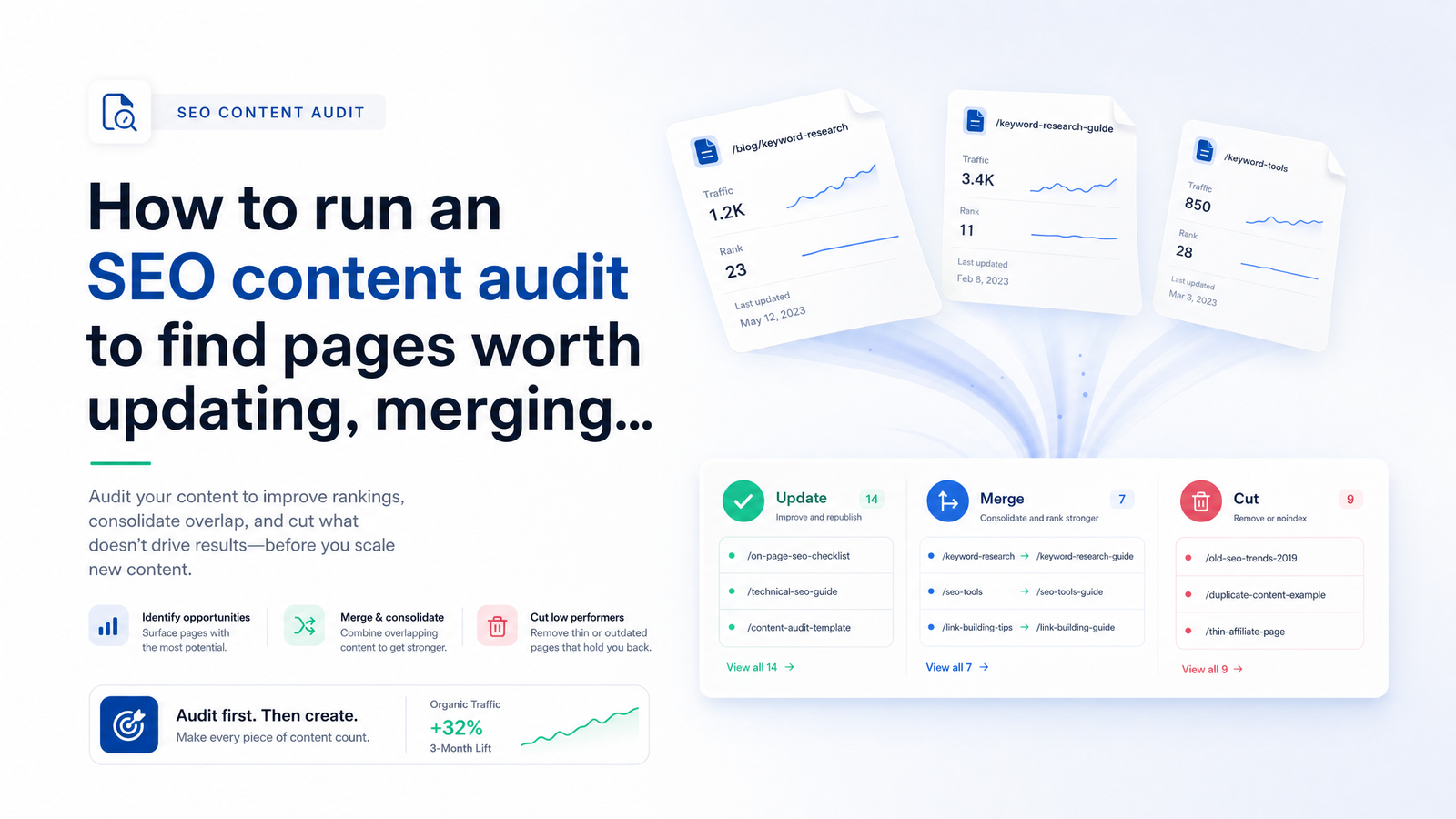
Why Audit Before You Scale Content Production
Most teams treat a content audit as cleanup after a traffic drop, not prep before a growth push. That's backwards. If you're about to turn on AI-assisted content production and publish at volume, an SEO content audit isn't optional housekeeping — it's a gate you pass through first.
Google evaluates sites holistically: pages that are unhelpful, thin, or overlapping can drag down how the rest of the domain performs, even pages that are individually fine. This is content decay in action — pages that once ranked slowly losing position and traffic as competitors improve, intent shifts, or content ages out of relevance. Scale production on top of a site with existing cannibalization and decay, and you're not adding growth — you're adding pages that compete with your own existing pages, diluting authority across near-duplicate targets and burning crawl budget and production hours on a leaking foundation.
The audit tells you, before you write another word, which pages are assets to build around, which are liabilities, and which overlap with content you already have. Skip it, and your new content plan inherits every unresolved problem the old plan created.
Step 1: Build the Content Inventory
A content inventory is the full list of your published pages paired with the performance data needed to judge each one objectively — not from memory or gut feel about "old pages that probably aren't working."
For every page, pull:
- Organic traffic trend over the last 6–12 months, not just a snapshot — a page holding steady reads very differently from one in freefall.
- Rankings and average position for its target keywords, plus how volatile that position has been.
- Impressions and click-through rate, which reveal whether a page is losing visibility (fewer impressions) or losing appeal (impressions steady, clicks falling).
- Backlinks and referring domains, since a page with real link equity is worth more caution than one nobody has linked to.
- Publish and last-updated date, a rough proxy for staleness.
- Conversions or assisted conversions, where applicable, so you're not judging on traffic alone.
Source this from Google Search Console (traffic trend, impressions, CTR, average position), your analytics platform (conversions, engagement), a rank tracker (keyword-level position history), and a backlink tool (referring domains, link quality). Drop it into a single content audit template — one row per URL, one column per metric — so every page is scored on the same basis. This inventory is the input everything else in this framework depends on; get it wrong or leave it incomplete and every downstream label is guesswork.
Step 2: Label Every Page — Update, Merge, or Cut
Once the inventory is built, every page gets one of three labels — a decision rule you can apply consistently, not a case-by-case argument for each URL.
Update — the page targets a keyword or topic worth owning but underperforms its potential: outdated statistics, thin coverage compared to what's now ranking, a decent backlink profile that isn't being capitalized on, or a ranking declined from a former peak. These pages have earned their keep; they just need work.
Merge — two or more pages compete for the same keyword or search intent. This is keyword cannibalization, worth a dedicated pass in your cannibalization audit: search your target keywords in Search Console's query report and check whether multiple URLs from your own site get impressions for the same terms, or whether rankings for one keyword bounce between two pages week to week. When that happens, the fix isn't two better pages — it's one stronger page. Consolidate the content, redirect the weaker URL to the surviving one, and reclaim the split authority.
Cut — near-zero organic traffic for an extended period, no backlinks worth preserving, and no strategic reason to keep it (no support for internal linking to a priority page, not a legal or informational requirement, not seasonal). This is where content pruning earns its place in an SEO plan: removing or noindexing dead weight so it stops diluting site quality signals and crawl budget.
The exception that trips teams up: a low-traffic page isn't automatically a cut candidate. A page with minimal search traffic but strong backlinks, an evergreen reference role, or a strategic internal-linking function can be worth keeping or improving rather than deleting. Traffic alone is an incomplete signal — that's why the inventory includes backlinks and conversions, not just sessions.
Step 3: Prioritize the Fixes
A mid-sized site audit routinely produces dozens or hundreds of flagged pages, and no team has bandwidth to act on all of them at once. Sequencing matters more than the labels themselves.
Start with pages ranking in positions 5–20 that show a declining traffic trend — a clear content decay signal. These are close enough to page one that a focused update can produce a fast, visible jump, and the decline means the clock is working against you the longer you wait.
Next, resolve cannibalization. Merges are usually low-effort (consolidate two pieces of existing content, set a 301 redirect) and high-impact, since they immediately stop two pages from splitting authority that should belong to one.
Then look at backlinked thin pages — pages with real referring domains but weak, shallow content. Expand these rather than deleting them; you'd be throwing away earned link equity that took real effort to acquire.
Everything else — low-traffic, no-backlink, no-strategic-value pages — goes last, batched together for pruning once the higher-impact work is done. This content audit priority order (decay signals first, cannibalization second, backlinked thin content third, cuts last) gives a team with limited hours a defensible order of operations instead of an unranked list of 200 flagged URLs.
Step 4: Turn the Audit Into a Production Plan
An audit that produces labels and then sits in a spreadsheet has accomplished nothing. The output needs to feed directly into what your team does next.
Merges and cuts get executed first: redirects go live, consolidated pages get republished, pruned pages get removed or noindexed. This is infrastructure work that should happen before new production ramps up, not in parallel — you don't want new pages targeting a keyword still contested by two zombie URLs you haven't merged yet.
Updates get scheduled into the content calendar alongside new content, not treated as a separate backlog that never gets prioritized against fresh ideas. A page ranking at position 8 with declining traffic often deserves calendar space before a brand-new topic with no existing footprint.
Only once merges are live and updates are scheduled should new content production scale. At that point, the audit and a gap analysis work together: the audit tells you what to fix in what exists, the gap analysis tells you what's genuinely missing, and combined they define a content publishing workflow where new pages complement the cleaned-up inventory instead of duplicating it. This is the difference between scaling on a stable foundation and scaling on top of unresolved cannibalization.
Keeping the Audit Current Instead of a One-Time Spreadsheet
The uncomfortable truth about any audit is that it's a snapshot. Rankings shift weekly, competitors publish and update their own content, and a page labeled "update" in January can decay further — or a "keep" page can start slipping — by the time your team acts on it three months later. A spreadsheet built once and referenced occasionally is stale within weeks, which is exactly why so many audits get done once and never repeated.
This is the case for a continuous content audit rather than a periodic one: rank tracking, traffic monitoring, and page labeling running as an ongoing workflow instead of a quarterly project. Rankevra is built around this idea — an AI SEO tool that pulls the audit data automatically, flags cannibalization and decay as they emerge, and connects those labels directly to scheduled updates and new production, so the classification stays live instead of aging out the moment you export it to a spreadsheet.
If you're preparing to scale content production and want the audit-to-action workflow running continuously rather than as a one-off spreadsheet exercise, Rankevra is built to do exactly that.
Frequently Asked Questions
How often should I run a content audit before scaling up publishing?
Run a full audit immediately before any major scale-up in production, then keep rankings and traffic monitored continuously rather than waiting for the next full audit cycle. A quarterly light review catches decay and cannibalization early enough to act on it, while a fully manual audit repeated only once or twice a year will miss problems that develop in between.
What's the difference between updating, merging, and pruning a page?
Updating means the page targets a valid keyword but underperforms its potential due to thin or outdated content. Merging applies when two or more pages compete for the same keyword or intent — cannibalization — and should be consolidated into one stronger page with a redirect. Pruning (cutting) means removing or noindexing pages with near-zero traffic, no backlinks, and no strategic role.
Will deleting old content actually hurt my SEO?
Deleting the right pages — those with no traffic, no backlinks, and no strategic function — typically doesn't hurt rankings and often helps by removing content that was diluting site quality signals. The risk only appears when you cut pages with backlinks or a defensible reason to exist; those should be updated or merged, not deleted, which is why the audit's exception rule matters.
How many pages should I audit at once if I have a large site?
Segment a large site by section or template and audit in batches rather than attempting every URL at once, prioritizing the sections most likely to carry decay or cannibalization, such as blog content or older product pages. Trying to hand-audit thousands of pages in a spreadsheet is where most manual efforts stall out, which is exactly the workload a continuous, automated audit is meant to absorb.
What tools do I need to run a content audit without an enterprise SEO budget?
At minimum, you need Google Search Console for traffic and ranking data, an analytics platform for conversions, a rank tracker for keyword-position history, and a backlink checker for referring domains — most of which have accessible or free tiers. An AI SEO tool that consolidates these into one workflow removes the need to license and reconcile several separate subscriptions.
How do I know if two pages should be merged instead of just one updated?
Check whether both pages appear in Search Console's query report for the same target keyword, or whether ranking position for that keyword swings between the two URLs over time — that's a clear cannibalization signal calling for a merge. If only one page targets the keyword and it's simply thin or outdated, an update is the right call instead.
Keep reading
- Structured Data Testing Tool Guide: Stop Silent Rich ResultA structured data testing tool won't catch everything. Learn the 3-stage workflow and 7 JSON-LD errors that pass validation but kill rich results.
- Page Experience Report SEO: What to Fix FirstLearn how to cross-reference the page experience report SEO data with rank tracking to prioritize fixes that actually move rankings, not just scores.
- AI Meta Description Generator: A System for Metadata atWhy AI meta description generators create duplicate tags at scale, the 2026 pixel-width limits that matter, and a template system that actually fixes it.