Rankevra Blog
How to Build a Topical Authority Map (5-Step Process)
August 9, 2026
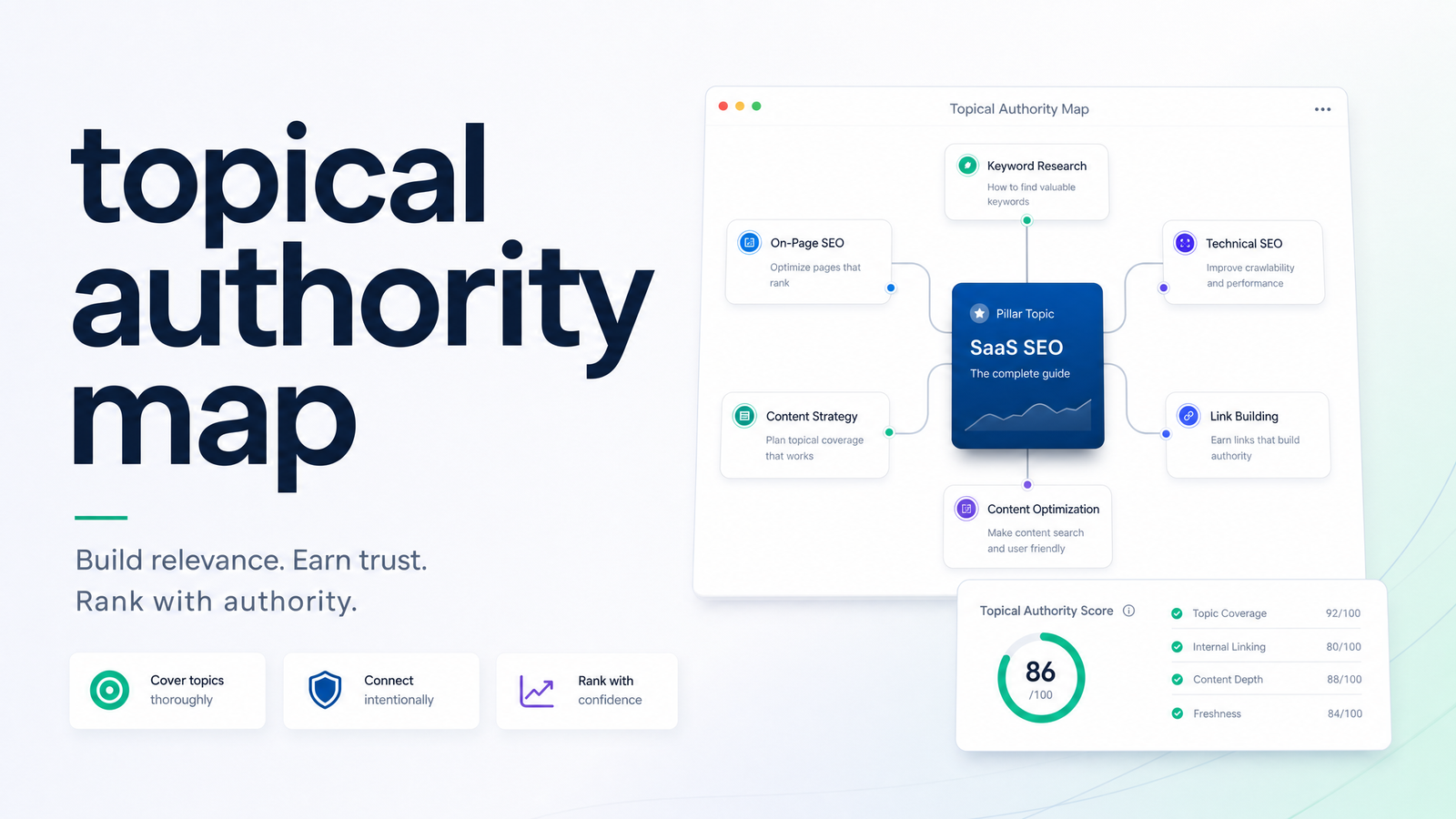
What a Topical Authority Map Actually Is (and Isn't)
A topical authority map is a structural diagram of how a pillar topic, its clusters, and every supporting page connect through intent and internal links. It is not a keyword list — a keyword list tells you what people search for; a map tells you how those searches relate, which page owns which query, and how authority flows between pages.
Most "maps" teams produce are actually spreadsheets — rows of keywords grouped by topic, color-coded, sitting in a Google Sheet nobody opens after week two. A real topical authority map is a living structure with defined hierarchy, assigned ownership, and a maintenance cadence. For the conceptual case for why topical authority matters before you build anything, this framework covers the "why." This article covers the "how."
The failure pattern is consistent: teams do keyword research, group it loosely, publish a burst of content, then stop. Six months later the map bears no resemblance to the site because nobody owned updating it. Fixing that means treating the map as an artifact with explicit "done" criteria, not a one-time deliverable.
Step 1: Lock the Pillar and Its Boundaries
Every map starts with one pillar topic — the broad subject you want to be the definitive resource on. The mistake most teams make is picking a pillar too wide to ever finish, like "digital marketing," instead of something buildable, like "email marketing automation for e-commerce."
A workable pillar has three properties: it's narrow enough to realistically cover in 30-60 supporting pages, it maps to a real commercial or informational intent, and it has a natural ceiling — a point where you can say "this pillar is covered" rather than expanding indefinitely.
Set explicit boundaries before you inventory a single subtopic. Write down what's in scope and what's explicitly out. If your pillar is "topical authority map," an out-of-scope decision might be excluding general on-page SEO tactics that belong to a different pillar entirely. Boundaries stop a map from sprawling into an unmanageable tangle of tangentially related pages that dilute rather than reinforce the pillar.
Step 2: Inventory Subtopics and Tag Them by Intent
With the pillar locked, populate the map with every subtopic a genuinely authoritative resource would need to address. Pull from keyword research, competitor coverage, "People Also Ask" data, and forum questions — but the goal isn't just a longer list. Every entry should earn its place by answering a real question your audience has about the pillar.
For each subtopic, assign search intent (informational, commercial, navigational, or transactional) and content format (how-to guide, comparison, listicle, tool page, template). This pairing matters more than most teams realize — a subtopic tagged "commercial intent, comparison format" needs a completely different page than one tagged "informational intent, definitional format," even if the keywords look similar in a research tool.
The deeper mechanics of clustering keywords — search volume thresholds, SERP overlap checks, cannibalization avoidance — deserve their own process. If you haven't run one yet, a content gap analysis tells you which subtopics are missing entirely versus already covered by a competitor or, worse, by your own unlinked page.
A subtopic belongs on the map if it satisfies a distinct sub-intent under the pillar and doesn't duplicate a page you already have planned. If two subtopics would produce nearly identical pages, merge them. If a subtopic is only tangentially related to the boundaries from Step 1, cut it — even with decent search volume. Volume without topical fit just adds maintenance weight later.
Step 3: Structure the Hierarchy and Internal Links
This is where a list becomes a map. Lay out a three-tier hierarchy: the pillar page at top, cluster pages beneath it representing major subtopics, and supporting pages beneath each cluster covering narrower questions or long-tail variations. This structure is what search engines use to infer that your site has depth on a subject rather than scattered, disconnected posts.
The internal linking pattern is not optional decoration — it's the mechanism that transmits topical authority between pages. The standard pattern:
- The pillar page links down to every cluster page beneath it, using descriptive anchor text matching the cluster's core query.
- Every cluster page links back up to the pillar, and across to sibling clusters where there's genuine relevance — not forced cross-links for the sake of link count.
- Supporting pages link up to their parent cluster and, where relevant, sideways to other supporting pages that share intent.
This is also where entity SEO reinforces the structure: consistent terminology and named entities across pillar, cluster, and supporting pages help search engines recognize the site as a coherent topical unit rather than a pile of loosely related articles. If you're evaluating whether your current site architecture supports this kind of linking at scale, this framework for evaluating internal linking tools walks through what to look for before committing to a manual or automated approach.
A map is "done" at this stage only when every node — pillar, cluster, supporting page — has at least one inbound and one outbound link defined on the map itself, not just implied. A node with no linking plan is decorative, not structural.
Step 4: Prioritize the Build Order
Dozens of mapped subtopics rarely get built in the order they were listed, and shouldn't be. A simple three-factor scoring method works better than gut feel:
- Competition — how difficult is it to rank for this subtopic given current SERP occupants and their E-E-A-T signals? Lower competition topics can often be won faster and build early momentum.
- Existing coverage gaps — does this subtopic address something competitors haven't covered well, based on your gap analysis? Gaps are where new content earns disproportionate traffic relative to effort.
- Business value — does ranking for this subtopic drive revenue, leads, or brand relevance, or is it purely informational volume with no downstream value?
Score each mapped subtopic 1-3 on each factor and build in order of combined score. This beats "build whatever's easiest" because it forces a tradeoff conversation instead of letting whoever's loudest decide the roadmap. For example, if your pillar is "email marketing automation," a subtopic like "abandoned cart email sequence examples" might score high on business value and gap opportunity even at moderate competition — that outranks a low-competition but low-value definitional page nobody searches commercially for.
Resist building strictly top-down by hierarchy. Pillar pages often perform better once several supporting cluster pages already exist and link up to them, giving the pillar internal signal before it needs to compete for external authority alone.
Step 5: Maintain the Map as a Living System
A map without an update cadence degrades the moment it's finished, because SERPs, competitor coverage, and your own site change continuously. Set explicit triggers for revisiting it rather than relying on someone remembering:
- New SERP entrants or format shifts — if a subtopic's top results suddenly shift format (say, listicles replaced by comparison tables), that's a trigger to reassess the assigned content format from Step 2.
- Content refresh cycles — any page older than 6-12 months should be checked against the current map for accuracy, new subtopics that emerged since publication, and outdated internal links.
- Gap analysis reruns — periodic gap analysis will surface subtopics competitors have added since your last inventory. Add them, tag intent and format, and slot them into the priority queue from Step 4.
Assign explicit ownership for this maintenance cadence — a person or team accountable for reviewing the map quarterly, not "whoever has time." Topical map maintenance fails almost exclusively because of ownership gaps, not because the process is unclear.
From Map to Execution: Where Most Teams Get Stuck
A finished map is a plan, not a result. The gap between a well-structured topical authority map and actual ranked pages is where most teams stall — the map says what to build and in what order, but someone still has to audit existing pages, draft new ones, publish them with correct internal links, and track whether they're moving in rankings. Doing that manually across dozens of mapped subtopics is exactly the kind of repetitive, multi-tool work that causes maps to go stale in the first place.
Once the map defines what content to produce, the next real decision is how that content actually gets written and structured — this framework on AI content strategy is the natural next step for turning mapped subtopics into pages built to rank rather than just built to exist.
This is the gap Rankevra is built to close. Instead of exporting your map into a spreadsheet and manually assigning writers, Rankevra lets you feed in the mapped structure and automate content workflow around it: scheduled technical audits against each page, AI-drafted content matched to the intent and format assigned in Step 2, publishing with the internal linking pattern from Step 3 applied automatically, and rank tracking that flags when a mapped topic needs a refresh. It's the AI SEO tool layer that turns the map from a planning document into an operating system for your content.
Frequently Asked Questions
What exactly is a topical authority map and how is it different from a keyword list?
A topical authority map is a structural diagram showing how a pillar topic, its clusters, and supporting pages connect through search intent and internal links. A keyword list only shows what people search for; the map shows which page owns which query and how authority flows between them through defined linking, which is what makes it a living structure rather than a static reference.
What are the concrete steps to build one from scratch?
Lock a tightly scoped pillar topic with clear boundaries, inventory subtopics and tag each with intent and format, structure the pillar-to-cluster-to-supporting-page hierarchy with defined internal links, prioritize build order using competition, gaps, and business value, then set a maintenance cadence with clear ownership. Skipping the linking or maintenance steps turns a map into a decorative list.
How do you decide which subtopics belong on the map and which don't?
A subtopic belongs if it addresses a distinct sub-intent under the pillar and doesn't duplicate a page already planned. Cut subtopics only tangentially related to the pillar's defined boundaries, even with decent search volume, since volume without topical fit adds maintenance weight without adding authority.
How should internal links be structured once the map exists?
Pillar pages should link down to every cluster page beneath them, cluster pages should link back up to the pillar and sideways to genuinely relevant sibling clusters, and supporting pages should link up to their parent cluster. Every node on the map should have at least one inbound and one outbound link defined explicitly — a node without a linking plan is decorative, not structural.
How do you prioritize which mapped topics to build first?
Score each mapped subtopic on three factors: competition level in current SERPs, existing coverage gaps versus competitors, and business value if it ranks. Build in order of combined score rather than strictly top-down by hierarchy, since supporting cluster pages often help pillar pages perform better once they're already linking up to it.
Ready to Execute Your Map?
A topical authority map only earns its value once it's executed, and most maps stall the moment they hit a spreadsheet with no one assigned to build or maintain them. Rankevra turns a mapped structure into scheduled audits, AI-drafted content matched to your assigned intent and format, automatic internal linking, and ongoing rank tracking — so the map keeps operating instead of going stale in a shared drive.
Keep reading
- Content Decay SEO: How to Detect It and Fix It for GoodLearn to detect content decay SEO issues early, rule out false positives, and build a refresh pipeline that scales — plus how to automate the whole loop.
- Headless CMS SEO: Fixing the Gaps Generic Tools MissHeadless CMS SEO breaks in three predictable places: rendering, metadata, and sitemaps. Here's the diagnostic framework to find and fix each gap.
- Google Algorithm Update Recovery: A Diagnostic FrameworkA step-by-step google algorithm update recovery framework: confirm the cause, segment the damage, benchmark against winners, and set a real timeline.